
Google AI Is Not One Tool. It’s an Entire System
- March 25, 2026
- Posted by: faznew
- Category: Blog
Google AI Is Not One Tool. It’s an Entire System
Most people are still looking at AI the wrong way.
They compare one app against another. One chatbot versus another. One image tool versus another. One video tool versus another.
That is how most people think about AI today.
But that is not how the next wave of advantage will be built.
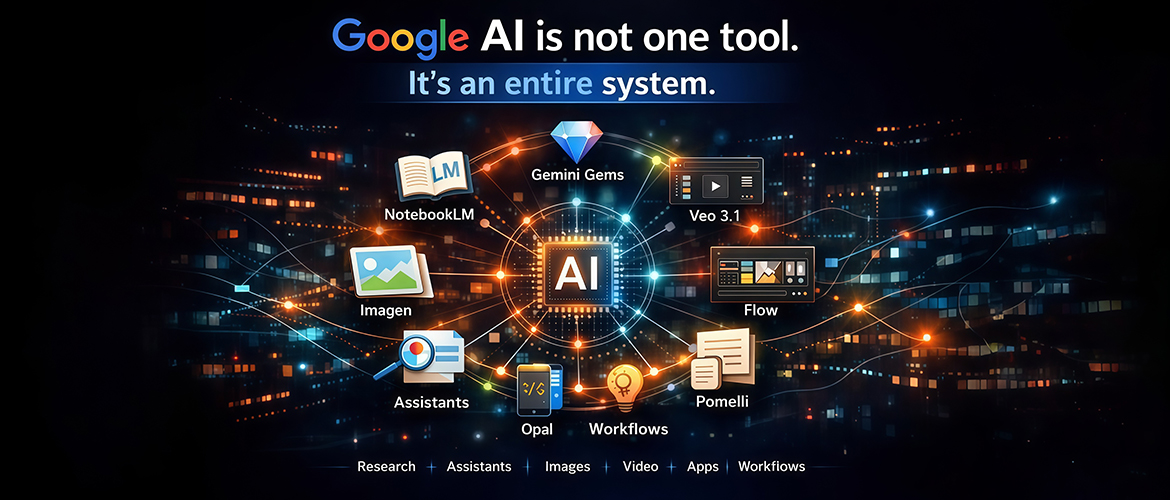
If you look closely, Google AI is not behaving like a company launching random AI features. It is quietly assembling something much bigger: a connected system for research, custom assistants, image creation, video production, app building, and workflow execution. Google’s current product direction across NotebookLM, Gems, Google AI Studio, Imagen, Veo, and Flow makes that pattern increasingly clear.
That is the real story.
Google AI is not one tool. It is an entire system.
And once you start viewing it that way, the strategic opportunity becomes much clearer.
Most people ask the wrong question about AI
Most people ask the wrong question about AI.
They ask: Which AI tool should I use?
That sounds like a smart question, but it is already becoming outdated.
In the early phase of AI adoption, choosing the right tool gave people a real edge. Being early to a strong writing tool, image generator, or automation platform mattered. But the market is maturing quickly. The gap between basic tool awareness and actual competitive advantage is shrinking.
The real edge is no longer about knowing one great tool.
The real edge is about knowing how to connect multiple tools into a workflow that helps you think faster, create faster, and execute better.
That is why Google AI deserves more strategic attention than it currently gets.
Because when you examine the ecosystem as a whole, it becomes obvious that Google is not just entering the AI race. It is building infrastructure for how work gets done in the AI era.
The shift from AI tools to AI systems
The biggest mistake founders, marketers, creators, and even educators make is treating AI like a collection of isolated apps.
- They use one tool for writing.
- Another for image creation.
- Another for video.
- Another for notes.
- Another for research.
- Another for automation.
That approach works, but it creates fragmentation.
- Different interfaces.
- Different logic.
- Different workflows.
- Different learning curves.
- Different contexts.
What Google AI is gradually building is different.
It is creating a stack where research, reasoning, content generation, visual creation, video production, and experimentation can work together more smoothly. NotebookLM is built for source-grounded research, Gems are built for reusable custom experts, AI Studio is an experimentation environment, and Flow is positioned by Google as an AI filmmaking tool built with Veo, Imagen, and Gemini.
That matters because the future winners will not be the people who use the most AI tools.
They will be the people who build the most effective AI workflows.
And Google AI is becoming increasingly relevant in that conversation.
NotebookLM: the research layer
One of the clearest examples of Google’s systems approach is NotebookLM.
NotebookLM is not designed to be just another general-purpose chatbot. Its strength is helping users think with their own source material. Google positions it as a research and writing assistant grounded in the files, links, and documents you provide, and it has continued to expand its output formats over time.
That is a meaningful shift.
A lot of real work is not about asking random questions. It is about understanding your own material better:
client documents, internal notes, course content, research reports, training decks, white papers, website material, and interview transcripts.
NotebookLM helps turn static information into structured understanding.
For consultants, educators, strategists, researchers, and founders, that is powerful.
Before better content or better campaigns, you need better understanding.
NotebookLM strengthens that foundation.
Gemini Gems: the reuse layer
The next important layer is Gemini Gems.
This is where Google AI becomes more reusable and less dependent on one-off prompting. Google describes Gems as custom AI experts that users can create inside Gemini for repeated tasks and workflows.
One of the biggest inefficiencies in everyday AI use is repetition. People keep rewriting the same instructions, rebuilding the same context, and repeating the same task logic over and over again.
That does not scale.
Gems helps solve that.
Instead of starting from zero every time, you can create specialized assistants for tasks like:
- SEO analysis
- Blog ideation
- Ad copy creation
- Brainstorming
- Sales outreach
- Research synthesis
- Meeting preparation
- Content repurposing
That is where AI starts moving from novelty to operational utility.
A founder could create a strategy assistant.
A marketer could create a campaign-planning assistant.
A consultant could create a client-audit assistant.
A trainer could create a curriculum-design assistant.
The real benefit is not just speed.
It is consistency.
When AI becomes reusable, it becomes systemizable.
And when it becomes systemizable, it becomes scalable.
Google AI Studio: the execution layer
If NotebookLM is the research layer and Gems is the reuse layer, then Google AI Studio is the experimentation and execution layer.
This is where Google AI starts to feel much more serious for builders, operators, and advanced users. Google AI Studio serves as one of Google’s core environments for working directly with models and multimodal capabilities, and Google has continued expanding it alongside newer Veo access.
That matters because the AI era will not be won only by people who casually use AI.
It will also be won by people who build with it.
AI Studio helps bridge the gap between playing with prompts and designing real workflows. It gives users a more direct path into testing, refining, and implementing ideas.
That makes it especially important for teams.
Once a company moves beyond occasional prompting and starts building internal workflows, creative systems, or multimodal processes, the need for a central experimentation layer becomes much more obvious.
That is one reason Google AI should not be underestimated.
The visual layer: Whisk, Imagen, and fast creative production
Google AI is also becoming more relevant on the visual side.
This is where tools like Whisk and Imagen matter. Google Labs presents Whisk as a visual creation tool that uses images as prompts, while Imagen remains part of Google’s broader generative media stack.
That is strategically important because many creators and marketers do not think in text first. They think in visuals, references, and examples.
A strong AI ecosystem cannot stop at text.
It also has to support ideation, design direction, and asset creation.
That is what the visual layer begins to do.
For marketers, this means faster creative testing.
For creators, it means faster ideation.
For agencies, it means better support for concept development.
For brands, it means a more scalable path to visual content production.
In other words, Google AI is not only helping people write.
It is helping them create.
Veo and Flow: Google AI’s move into video workflows
The most exciting part of the system may be what Google is building in video.
That is where Veo and Flow come in.
Google has expanded Veo 3.1 through its developer ecosystem, including Google AI Studio and the Gemini API, and Google describes Flow as an AI filmmaking tool built with Veo, Imagen, and Gemini.
That is a big signal.
Because it shows Google is not just building individual generation models. It is thinking about how creative work gets produced from start to finish.
This is the difference many people miss.
A model is a capability.
A workspace is a system.
When Google starts combining language, image, and video capabilities into a filmmaking-oriented environment, it signals something deeper: the company is designing connected workflows, not isolated features.
For marketers, that means more efficient creative production.
For creators, that means faster ideation and storytelling.
For educators, that means more scalable video content.
For businesses, that means less friction in one of the most demanding content formats.
Video is no longer a separate universe.
It is becoming part of the same AI system.
Why this matters for marketers, founders, and creators
This matters because competitive advantage is shifting.
If you are in marketing, the opportunity is not just using AI to write faster. It is building a system that helps you research faster, generate ideas faster, create assets faster, and produce campaigns faster.
If you are a founder, the opportunity is not just saving time. It is reducing execution friction across your team.
If you are a creator, the opportunity is not just making more content. It is building a workflow that improves consistency, speed, and quality.
If you are an educator or trainer, the opportunity is not just using AI for summaries. It is designing better learning systems, better teaching assets, and better research workflows.
The future does not belong only to the person with the best prompt.
It belongs to the person with the best workflow.
That is the real shift.
The real takeaway: AI workflow advantage
The phrase I would use here is simple:
AI workflow advantage.
That is the new edge.
- Not AI usage.
- Not tool awareness.
- Not hype.
- Not experimentation for its own sake.
- But real workflow advantage.
The ability to connect the right tools into repeatable, useful, scalable systems.
That is where productivity rises.
That is where quality improves.
That is where speed compounds.
That is where teams become more capable.
And that is why Google AI deserves serious attention right now.
Because it is increasingly clear that Google is not just participating in AI.
It is building one of the most important AI systems for the next phase of work.
Final thought
Most people will keep asking:
What is the best AI tool?
But the better question is:
What is the best AI workflow for the way I work, create, market, teach, or build?
That is the question that will matter more over the next few years.
And once you see Google AI as a system instead of a single product, the opportunity becomes much more obvious.
The winners in the AI era will not be the people who know one tool the best.
They will be the people who know how to connect tools into systems.
Because tools matter.
But systems win.
FAQ
Google AI is no longer just one assistant or one model. Google now has a broader ecosystem that includes research tools like NotebookLM, reusable assistants like Gems, model experimentation through Google AI Studio, image tools like Whisk and Imagen, and video tools like Veo and Flow.
No. Gemini is a major part of Google’s AI ecosystem, but it is not the whole system. Google also offers NotebookLM for source-based research, AI Studio for model experimentation, and media tools like Whisk, Imagen, Veo, and Flow.
NotebookLM is designed to help users work with their own source material. Google describes it as an AI notebook that can summarize, explain, and help generate insights based on the sources you upload or select. Google has also expanded it with newer overview formats, including audio and cinematic video overviews.
Gems are custom AI experts inside Gemini. They let you save detailed instructions for repeatable tasks, such as brainstorming, writing, coding, research, or planning, so you do not have to rebuild the same prompt context every time.
Google AI Studio is Google’s environment for experimenting with AI models and workflows. Google has also expanded access to newer Veo capabilities there, which makes it important for builders, developers, and advanced users testing multimodal workflows.
Veo is Google’s video generation model family, and Flow is Google’s AI filmmaking tool built with Veo, Imagen, and Gemini. Google says Veo 3.1 supports stronger creative control and production-ready quality, including image-to-video and vertical video workflows in supported surfaces.
Because the competitive advantage is shifting from using one AI app to building repeatable workflows across research, content, visuals, and video. Google’s product direction increasingly supports that systems-based approach. This is an inference from how Google’s tools now span research, custom experts, multimodal creation, and filmmaking workflows.